OpenAI x Hardware • Concept 2025

Yes

Role

Product Designer

Timeline

August - September

2025

Team

3 Designers

Skills

Product Design

Product Strategy

Prototyping

Overview

What should OpenAI build as their first AI device?

As a team of 3 product designers, our goal was to land on a clear vision within 7 weeks.

Product Strategy

Thinking broadly about OpenAI, the

AI landscape, and exploring widely

in the solution space.

Prototyping & Testing

Going wide in ideation and rapidly

testing concepts with users.

Iterating with Feedback

Continuously iterating on concepts

and validating product decisions.

Problem

ChatGPT is at the top of the of the stack.

ChatGPT is an app, at the top of this technology stack. That’s a risky place to be because it means leaves

OpenAI at the mercy of the lower layers, like the platform, the operating system, and the hardware.

Apple and Google are building their own consumer AI ecosystems, but with the advantage of being able to

control the entire stack.

However, OpenAI is currently dominating consumer AI, and Apple has recently dropped the ball on their Apple

Intelligence integrations. This creates an opportunity for OpenAI to build an AI device and capture consumers in

their own ecosystem.

Opportunity

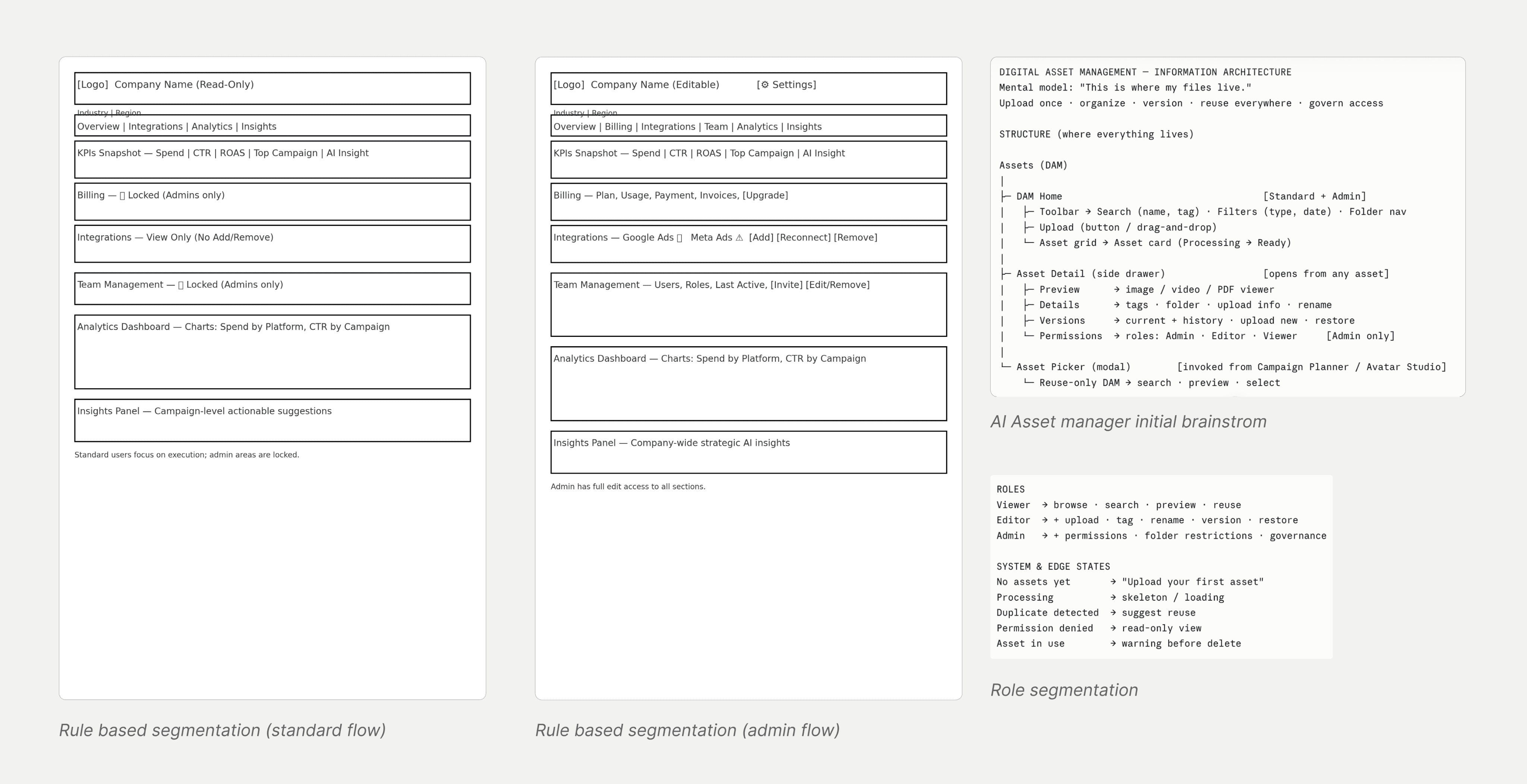
Memory as the core of OpenAI’s device ecosystem.

Memory should be OpenAI’s new moat. LLMs are becoming commoditized, but personalization and context are

the new differentiators. With hardware, OpenAI will benefit from:

Independence

No longer at the mercy of the

lower layers

Ecosystem lock-in

Capture users with a tightly-

integrated experience like Apple

does today

New input modalities

A device that can see, hear, and

remember in ways an app can't

Solution

Tomo: the AI device that remembers so you don’t

have to...

A pin and pendant wearable, serving as a camera and microphone on-the-go.

...powering Moments, logging memories in your

everyday life in ChatGPT.

Moments is a new atomic unit in ChatGPT, logging all the events, conversations, and solo adventures captured

with Tomo.

Core Flows

Smart prompts, in-the-

moment

Get prompts relevant to you in-the-

moment, with Tomo.

Chat with real-time context

ChatGPT can now respond to you with

understanding of your real life.

Look back on your moments

In the new Moments page, you can look

back on everything that’s happened,

catagorized by context.

Review a specific moment

Tap into each moment to see all the

important things that happened.

Onboarding to Tomo

Designing for an experience that will show users how Moments work and the immediate value of Tomo.

Research

Researching the AI landscape and current devices on

the market

We went deep into understanding OpenAI, and the world of consumer AI, agents, trends, and more. We

researched existing devices and tried some out ourselves!

Exploring Form Factors

Exploring product direction and form factor

We explored product direction and form factor, and designed for an experience that will show users how

Moments work and the immediate value of Tomo.

Strategic Directions

Productivity Tools

Targeting students, massive AI

adopters, with a familiar form

factor.

Home Devices

A less competitive space with

fewer constraints on battery life

and data plans.

Wearables

On-the-go form factors fit for

mass adoption.

Why Tomo?

Enhances ChatGPT

Leverages the app’s large and

fast-growing user base.

Leverages OpenAI’s

strengths

Taps into OpenAI’s unique

strengths of strong foundational

models, memory, and agents.

Easier to scale

Much cheaper to build and easier

to scale than glasses, watches etc.

Prototyping and Testing

Prototyping interfaces for real-world memory

We explored a ton of concepts for these 3 strategic directions, here are select few of them:

ChatGPT Feature Power-

ups

Using real-life context to enhance

existing features in the app

In-the-moment Canvas

Exploring interfaces focused on real-

time assistance

Memory-centered UI

Focusing on helping users look back

on their day

Testing and iterating with feedback!

We got users to try these prototypes, observed how they used them, how they felt, and got tons of valuable

feedback.

Key User Insights

Memory for recall, not reliving

People want to look back and remembering important

things, rather than re-experiencing them.

Surface relevant suggestions

Users want personalized prompts, reminders, and

tasks—both in the moment and as a recap at the end

of their day.

Design Decisions

We identified the most intuitive way to bring this

feature to life.

With insights and iteration from prototyping and testing, we got to thinking how a clear, intuitive solution could

be integrated within the existing ChatGPT ecosystem.

Where we landed

Insight 1: Memory for recall, not reliving

Moments as chat context

People want to look back and remembering

important things, rather than re-experiencing them.

Moments log as a new page

Users want personalized prompts, reminders, and

tasks—both in the moment and as a recap at the end

of their day.

Insight 2: Surface relevant suggestions

Smart prompts in-the-moment

We want to give users relevant prompts with real-

time context, in a less invasive way than our initial

exploration.

Smart Prompts for every moment

With prompts for every moment, users can look back

on their day and get smart suggestions.

Designing for Hardware Constraints

A device that is light-weight and always-recording

isn’t possible, yet.

We researched a bunch of products and found that high-quality camera recording doesn’t last more than a few

hours.

So we had to ask:

How do we maximize memory despite constraints of camera battery life?

Constraining the experience

Context-based Capture

In this case, Tomo would use real-time cues to choose when to record, balancing battery with context capture.

Considerations

How do we communicate

rationale for recording?

We could use a notification to let users

know why Tomo is recording.

Can AI detect when to

record?

We found that with transcripts alone, AI

is pretty good at identifying moments

worth recording.

Manual Capture

In this case, the user is always manually pressing or holding down the button to capture images and videos.

Considerations

How do we remind users to

record?

We could have a subtle on-device

indicator to remind users to record at

specific moments with non-visual cues.

What does a less visual

interface look like?

We could use icons to represent

moments without visual captures, and

pull context from other sources, like

LinkedIn headshots for coffee chats.

How do we deal with

imperfect captures?

We can use AI to enhance captures, like

making shots more flattering, or making

blurry photos clearer.

Trading memory for privacy

With manual capture, we’re making this tradeoff of less memory captured for more user privacy. This is

something we should lean into as a strength. Privacy really matters to users, and we want to make it a deliberate

design decision that helps us gain trust with users and lowers the barrier to entry of using a product like this.

This is a trade-off that we're willing to make for mass adoption.

Reflection

What I learned

Social signals matter.

We can't design just for the user, but also for those

who will be around them and perceive them. What

does Tomo imply for social settings? How can we

design hardware for self-expression?

Think in systems.

It's not just about designing an amazing feature, but

how it fits into the existing system, and how it fits into

users' mental models.